Customizing Gender Data in Housing.Cloud
Last updated: October 7, 2026
Housing.Cloud provides flexible data and customizable rules, allowing schools to tailor gender-related fields, tags, and functions to fit their needs. Each institution controls specific fields and values, ensuring that names and gender identities are displayed clearly alongside other key information, and not hidden on the page.
Schools can also📄 Create and Manage Tagsand easily implement room assignment and roommate matching policies through rulesets, promoting inclusive service for students.
Gender and Gender-related Fields
At initial setup, Housing.Cloud includes a variety of gender-related fields. During your onboarding process, your school will have an opportunity to customize the standard fields. Here are some data options available for each field:
Preferred Name
Gender [sometimes labeled ‘Gender at Birth’]:
Female
Male
Intersex
Gender Identity:
Female
Male
Non-binary
Prefer not to say
Pronouns:
He/Him
She/Her
They/Them
Other
Prefer not to say
Institutions that implement the preferred name and gender identity fields will see that data displayed alongside its related field so that your team can interact with students according to their identities. Here's an example of how the gender and gender-related data is displayed on Housing.Cloud.
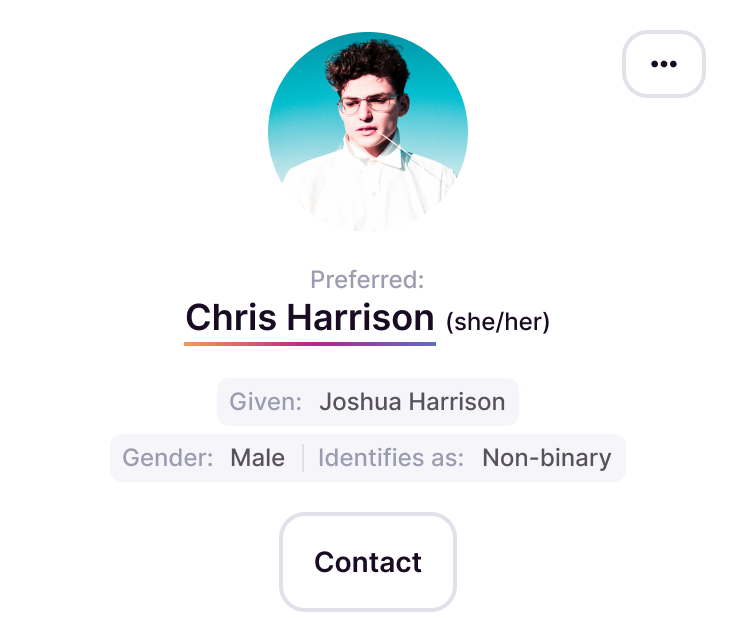
Using Gender-Related Information for Roommate Matching and Room Assignment
Institutions can use gender-related information to match roommates and assign rooms. Here's how:
Gender Tags
Tags are crucial for ensuring accurate and inclusive housing assignments. When students complete their applications, their information can be automatically turned into relevant tags to help define their unique characteristics and preferences.
For example, your institution could ask the question, "Would you like to be assigned to a gender-inclusive room?" with answer options as "Yes, No, and Doesn’t matter to me." Each answer could place a corresponding tag on the applicant (i.e., those who choose Yes map to a tag “gender-incl-YES”).
When creating your institution’s business ruleset for assigning students to rooms, you could then write a rule pair that says:
An Individual tagged as “gender-incl-YES” must be matched with an individual tagged as “gender-incl-YES” or “gender-incl-EITHER”
An Individual tagged as “gender-incl-NO” must be matched with an individual tagged as “gender-incl-NO” or “gender-incl-EITHER”
Learn how to write rulesets here.
That rule pair will ensure that those requesting gender-inclusive housing are matched with other students requesting the same or those who have said they have no preference.
<aside> [Insert image of the ruleset maker in Admin with those two rules written out and add a link pointing to how to create forms and create tags from forms]
</aside>
This example ruleset could easily be modified to assign students to rooms that have been tagged according to their gender type if your institution pre-designates room genders.
Using Tags in conjunction with Rulesets in this matter helps housing administrators assign, communicate, and understand student needs more effectively.
Gendering Rooms
Gendering a room refers to the methods and policies your institution uses to assign students to live together based on their gender. This process determines how students are matched with one or more roommates. Housing.Cloud’s flexible tagging and customizable rulesets can accommodate nearly all room gendering schemes.
Explicit Gendering
Explicit gendering is employed if your institution simply applies a gender designation to each room (i.e. “This room is for males. This room is for females. This room is for non-binary individuals.” This is achieved in Housing.Cloud by tagging each room with a specific gender tag and writing a ruleset that includes a rules pair or trio, such as
An “Individual tagged as “male” must be assigned to a room tagged as “male”.
An “Individual tagged as “female” must be assigned to a room tagged as “female”.
An “Individual tagged as “non-binary” must be assigned to a room tagged as “nonbinary”.
Implicit Gendering
Implicit gendering is used when your institution leaves rooms untagged by gender and instead uses person tags to implicitly assign a gender to the room once the first person selects it. A ruleset for this approach might include:
An individual tagged as “female” must be matched with individuals tagged as “female.”
An individual tagged as “male” must be matched with individuals tagged as “male.”
An individual tagged as “non-binary” must be matched with individuals tagged as “non-binary.”
The result of this rule grouping is that the first student who chooses a room effectively genders the room with their gender. These rules ensure that once one student is in the room, only students of the same gender will see that room as an option moving forward.