How Satisfaction Ratings Work
Last updated: October 8, 2026
Three days after a resident's request is closed, Housing Cloud emails that resident and asks them to rate how it went. The rating email, the rating page and the limits around it all work the same way for every request type: the email goes out on its own schedule, the resident rates from the link, and their answer appears on the task and in the Satisfaction dashboard.
Before you start
Two switches decide whether rating emails are sent at all:
The Task satisfaction ratings switch must be on for your school. Authorized staff turn this switch on themselves from the Task Satisfaction Ratings card on the setup features page (/admin/setup/features), which provides an Enabled/Disabled control. Ask your Housing Cloud contact if you don't have access to it.
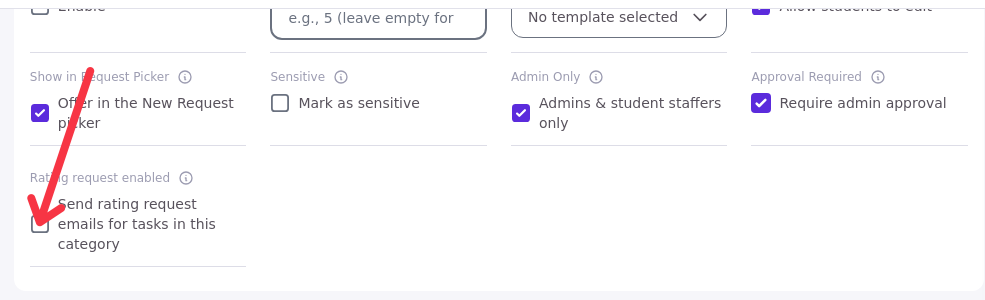
Rating request enabled must be ticked on the request type, so tasks in that type are included. You set this on the request type card (article 3).
When the rating email goes out
The email is sent 72 hours after a request is closed or cancelled, or after its approval is decided. Each close sends one email. The delay can't be changed.
Reopening the request before the email has gone out cancels it. Closing the request again starts a new 72-hour count and a new email.
Who is asked to rate
The email goes to the resident who filed the request. Two kinds of requests are never rated:
Requests filed on a resident's behalf, at the desk or by an RA (article 15).
Tasks staff created themselves.
Residents who cancel their own request are asked to rate it: the rating email treats a cancelled request like a closed one.
What the email says
The email's subject is "How was your experience with <school>?" and its body heading reads "How was your experience?". The link inside it opens the rating page without signing in, so it works on any device the resident has.
What the resident sees on the rating page
The rating page asks for 1 to 5 stars: Poor, Not great, Okay, Good, Excellent. Under the stars, quick picks change with the score, so the resident can say what went well or what went wrong:
Positive picks: Fast response, Friendly staff, Clear communication, Solved completely.
Negative picks: Took too long, Hard to reach someone, Unclear updates, Issue not fully fixed.
The resident can also write a comment of up to 2,000 characters. The quick picks they ticked are saved as part of the comment text.
First submission wins
A resident can't change a submitted rating. Opening the link again shows the already-rated page. An old link opened after the request was reopened shows a cancelled page instead.
Stopping future rating emails
The Unsubscribe link on the rating email stops all future rating emails for that resident. Residents can also stop the emails themselves from the portal: the Notification Preferences page has a Get task rating emails after a request is resolved setting. That control and the email's Unsubscribe link both end future rating emails for the resident; the Unsubscribe link works from the email itself, while Notification Preferences is always available in the portal.

Where the rating shows up for staff
Staff see the score on the task page, in the queue's Rating column, and on the Satisfaction dashboard (article 24).
There is no rate button inside the resident portal. The email link is the only way a resident can rate a request. If a rating is due but hasn't arrived, check that the request was actually closed, that the type has Rating request enabled, and that 72 hours have passed.
Good to know
Ratings come three days after closing, by email only. No rate button in the portal; the delay can't be changed. The manual Send task rating now is for Housing Cloud staff only.
On-behalf and staff-made tasks are never rated.
Residents who cancel their own request are asked to rate it. The rating email treats Cancelled like Closed.
First rating wins. A resident can't change a submitted rating. The quick picks are saved as part of the comment text.