Waypoint Email Builder Overview
Last updated: October 5, 2026
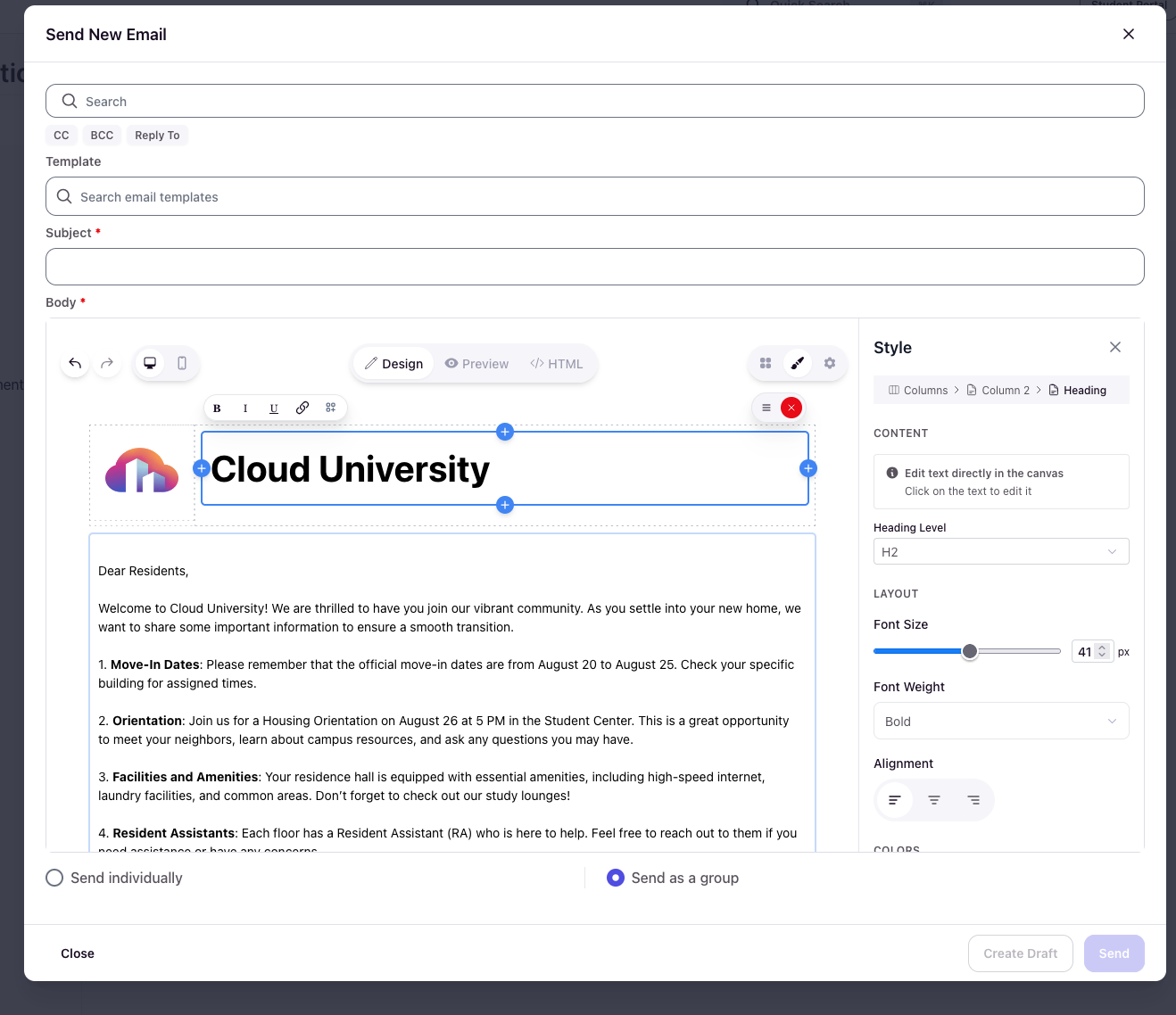
The Waypoint Email Builder is a drag-and-drop editor for designing emails in Housing.Cloud.
It replaces the legacy text editor with a modern, block-based interface that gives you more control over layout, styling, and personalization.
This editor appears when composing messages or creating email templates. It makes it easier to design professional-looking emails without needing to write HTML code.
Where You'll Use the Editor
The Waypoint Email Builder appears when you create or edit communications in the Admin Portal. Access it by navigating to Communications and clicking Send New Message, or by editing email templates in the Templates tab.
The editor opens in a modal window where you can compose your message content and configure formatting.
Block-Based Design
The editor uses a drag-and-drop block system. Add content by dragging blocks into your email canvas, then customize each block individually.
Available blocks include:
- Text — Paragraphs, headings, and formatted text
- Image — Upload and display images inline
- Button — Call-to-action buttons with custom links
- Divider — Visual separators between sections
- Columns — Multi-column layouts for side-by-side content
Each block can be styled independently using the inspector panel, which controls text color, background color, padding, and margins.
More details on how to arrange and edit these can be found in the article Creating and Managing Blocks
Styling and Customization
The Style panel on the right side of the editor lets you customize the appearance of each block. Select any block in your email to reveal its styling options.
Common style controls:
- Text color — Change font color for text blocks
- Background color — Add colored backgrounds to blocks
- Padding — Control internal spacing within blocks
- Margin — Adjust spacing between blocks
Your institution's default email template loads automatically when you start a new message, giving you consistent branding across all communications.
File Attachments
Attach files directly to your emails by dragging them into the attachment area or selecting them from your computer. Supported file types include PDFs, Word documents, and images.
Individual files can be up to 10MB, with a total attachment limit of 25MB per email.
Preview and View Modes
The editor provides multiple ways to view your email as you build it:
- Design view — The default editing canvas with drag-and-drop blocks
- Preview — See how your email will look to recipients
- HTML view — Review the underlying HTML code
Use the preview mode before sending to catch formatting issues or check how dynamic variables will display. The preview includes both desktop and mobile views so you can verify your email displays correctly on all devices.
Templates and Reusability
The Waypoint Email Builder works with email templates, allowing you to create reusable designs. When you access the editor from the Templates tab, you can save formatted layouts with placeholder content and variables.
Templates make it easy to maintain consistent messaging for common communications like welcome emails, deadline reminders, or housing announcements.
Converting Old Templates
Your existing email templates created in the legacy editor will automatically convert to the new Waypoint Email Builder format. You don't need to manually recreate or update them.
When you open an old template in the editor, the system converts the HTML content into blocks that you can edit using the drag-and-drop interface. Your formatting, variables, and custom content remain intact.
The conversion happens in real-time when you open the template. Your original template is preserved until you save changes in the new editor.