Dependents Troubleshooting
Last updated: October 8, 2026
Dependent and household problems fall into a handful of symptoms: a dependent who can't sign in to the portal, a person who never appears in a picker or wizard, an add or assignment refused because of group limits or existing memberships, a missing or greyed-out option in application review or rollover, dependents missing from the residents grid, a student who cannot find My Household, and a refused edit or delete on a type, role, or member. Find your symptom below for the cause and the fix.
A dependent can't sign in to the portal
A dependent who sees the message "This account does not have login access. Contact your housing administrator." at sign-in has no active dependent assignment with login enabled.
Cause. The portal blocks a dependent only when they have an active dependent assignment with a dependent-type role and none of their active assignments has login enabled. Login access is controlled at two levels:
Can log in in the role editor under Setup > Dependent Management. This default exists for dependent roles only, is described as "Members of this role can sign in to their own account.", and is off by default.
Grant login access in the assignment modal, described as "Selected dependents can sign in to the housing portal." and off by default. The assignment-level value is what takes effect; the role default applies only when the assignment does not specify.
Fix. When assigning a dependent, turn on Grant login access in the assignment modal. For an assignment that does not specify login access, set Can log in in the dependent role editor under Setup > Dependent Management.
If the dependent was recently removed from a group, their assignment is inactive and access stops with it. Re-adding them reactivates the assignment and restores access when login is granted.
Primary members always have login access, so this error affects only dependents assigned a dependent-type role. Changing the role default requires the Manage dependent group types and roles permission; working with assignments requires the Create and manage dependent groups permission.
Verify. Once login access is in effect, the dependent can sign in to the housing portal.
A person doesn't show up in the member picker
Cause. The two assignment pickers search different populations of profiles, and several conditions hide people from the results:
Assign primary searches only residents and applicants; the picker states "Search residents and applicants. People already assigned as dependents are hidden." Use Assign dependent to find an existing dependent.
Assign dependent searches only profiles already marked as dependents. If the person has no dependent profile yet, create one first with Add Dependent.
Profiles already assigned under the selected kind of role (primary or dependent) in this group are hidden from the results.
Search needs at least two characters and returns at most five matches.
Profiles marked sensitive are hidden when you do not have sensitive-profile access.
Someone who already belongs to another dependent group is not hidden from the picker; the conflict surfaces when the assignment is saved (see the next section).
Assigning a member says they already belong to a group for this cycle
Cause. A profile can belong to only one dependent group per housing cycle. When you assign someone who is already in a group for that cycle, the assignment is rejected with "[Name] is already a member of a dependent group ([group name]) in this cycle. A profile can belong to only one group per cycle." The New Dependent Group wizard shows the same conflict as "[Name] already belongs to a dependent group in this cycle. A profile can belong to only one group per cycle - remove them here or from their existing group first."
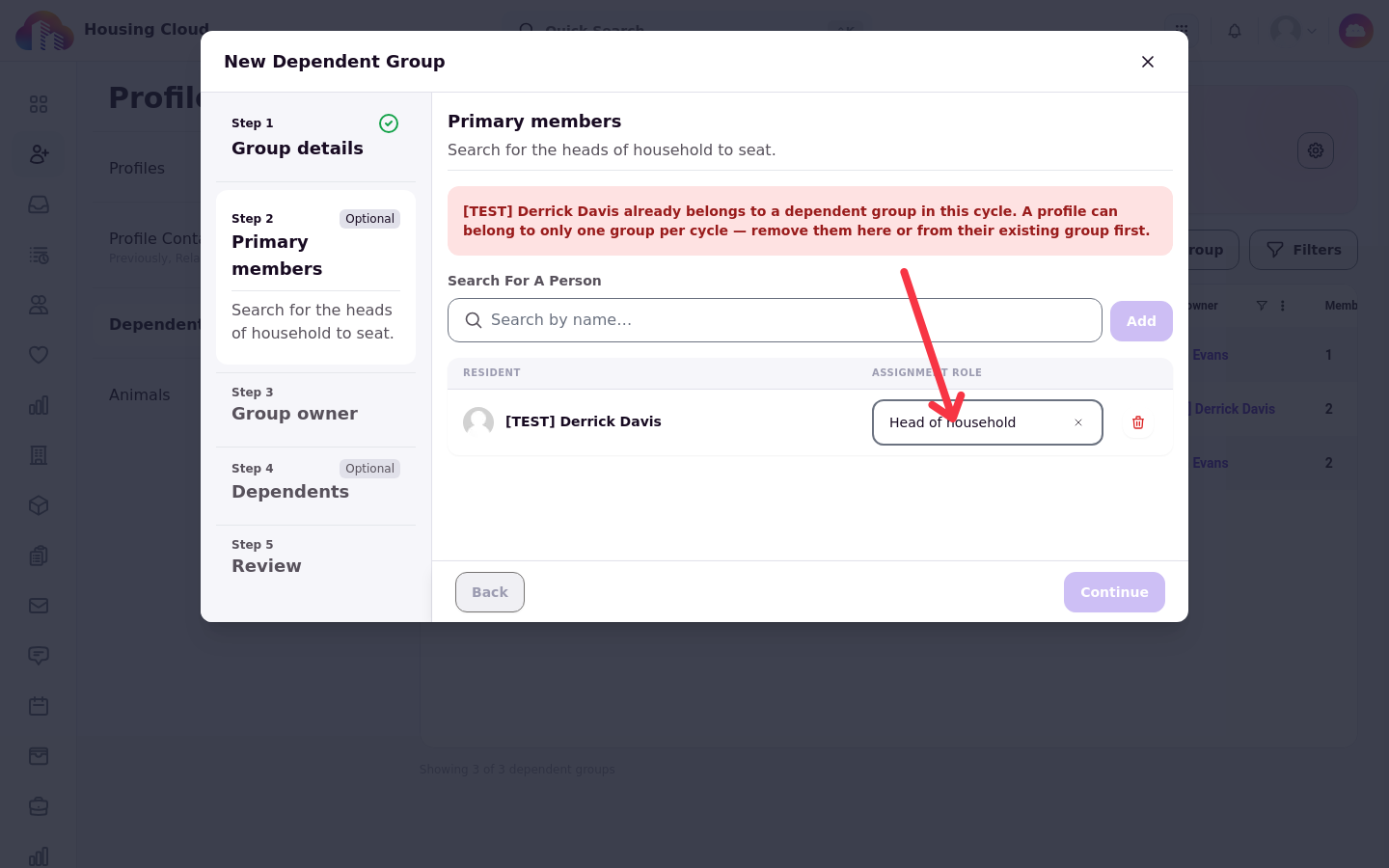
A related block appears when the person is in a roommate group: "[Name] is a member or owner of a roommate group, so they can't be added to a dependent group. Remove them from the roommate group first."
Fix. Remove the person from their existing group, or from the group you are building, then assign them again. Removing a member is covered in Create and Manage a Dependent Group. For the roommate-group block, remove the person from the roommate group first; students can leave a roommate group themselves (see How to Join or Leave a Roommate Group, for Students).
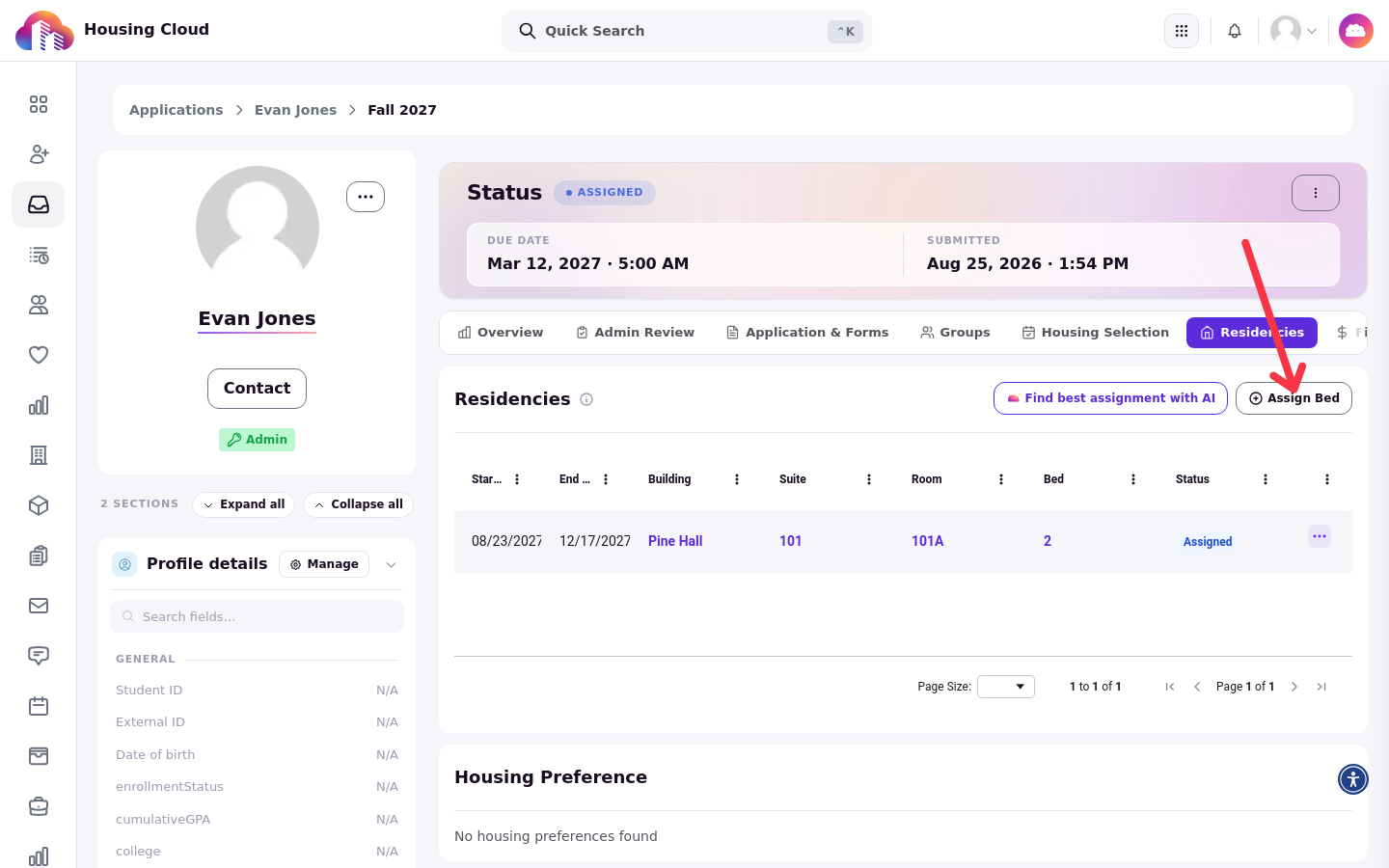
Assign Dependent Group doesn't appear in application review
Cause. The Assign Bed menu in application review lists only active dependent groups owned by the applicant in the application's cycle. The option is missing when the group is Draft, Inactive, or Archived, when the group belongs to a different cycle, when the Dependents feature is off, or when you lack the View dependent groups and members permission.
When the applicant is in a roommate group, the option appears but is disabled, with the explanation "This applicant belongs to a roommate group, so they can't also be assigned to a dependent group."
Fix. Set the group to Active in the same cycle as the application. For the disabled option, remove the applicant from the roommate group first.
Dependents are missing from the residents grid
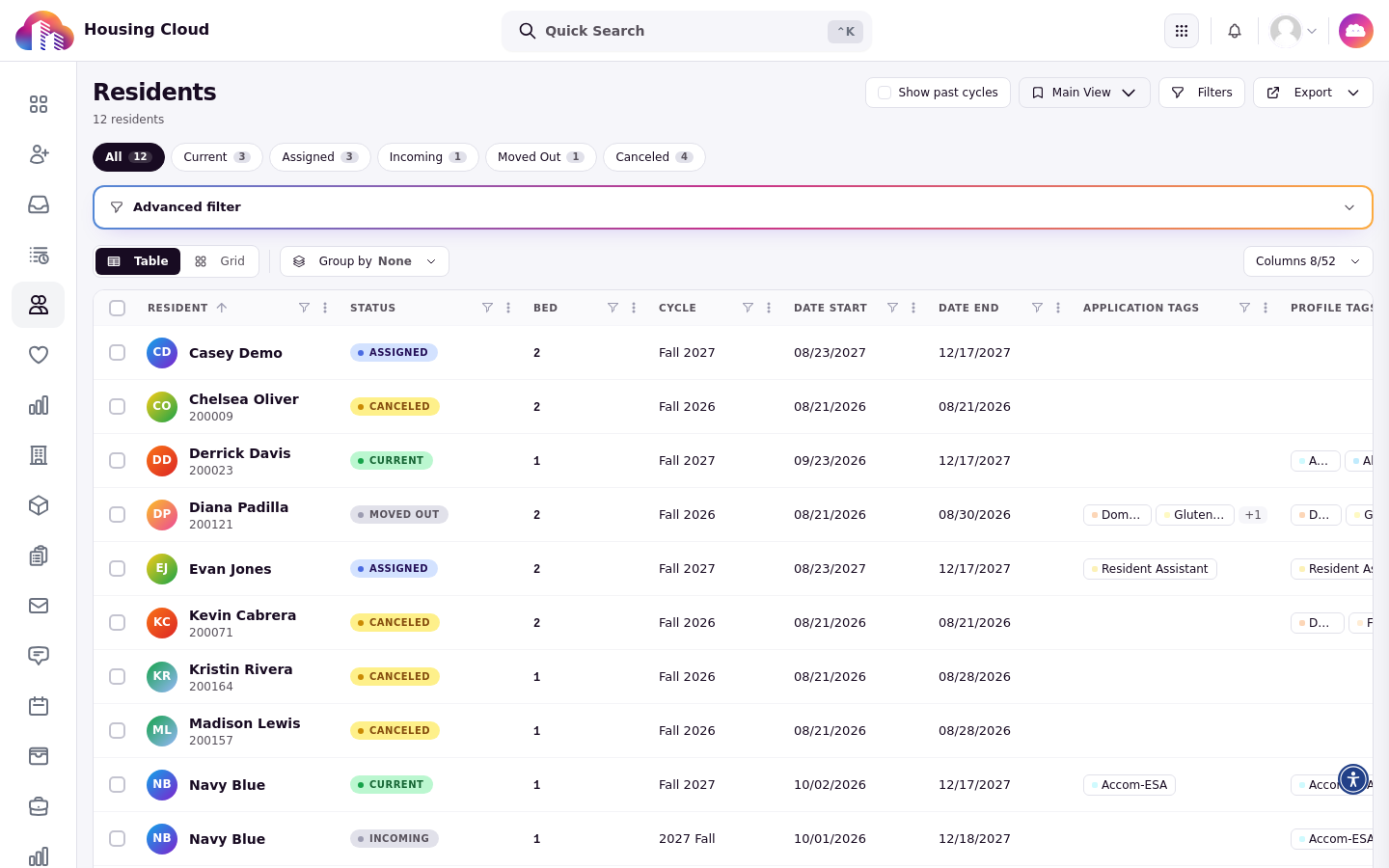
Cause. The residents grid is scoped to current cycles by default, so members of dependent groups tied to past cycles are not shown until past cycles are included.
Fix. Turn on the Show past cycles toggle above the residents grid, or group by Dependent group with past cycles shown.
A student can't find My Household
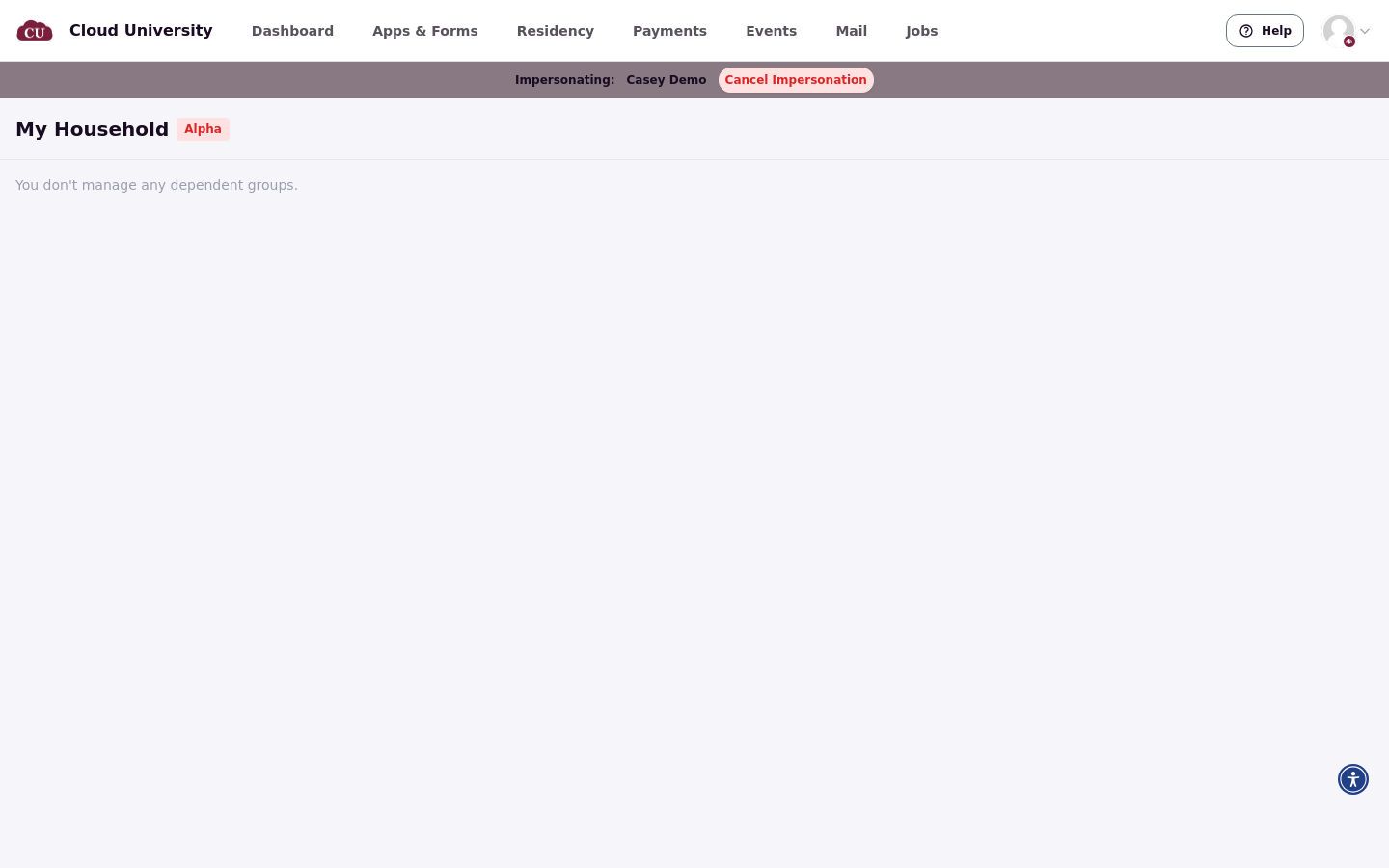
Cause. There is no link to the My Household page in the portal's navigation; residents reach it only at your portal address plus /dependents. The page also lists only the groups where the signed-in person has an active primary assignment, so a dependent sees "You don't manage any dependent groups." even though they belong to a household.
Fix. Share the direct URL, your portal address plus /dependents, with the primary resident. See Help Residents Use the My Household Page.
The group shows "Resolve before activating"
Cause. The group doesn't meet its type's member counts. The Resolve before activating box on the group's page lists what is missing, such as "Add at least 1 primary member", and the group stays in Draft until every issue is fixed.
Fix. Add or remove members until the counts meet the type's minimums and maximums, then mark the group Active. Maximums are also checked whenever someone is added; minimums are checked when the group is marked Active.
The wizard stops with "role designates the group owner"
Cause. Two primary members hold roles with Group manager by default on. A red banner reads "The “Head of household” role designates the group owner, so only one member can hold it. Reassign or remove the extra primary members." and the wizard won't continue.
Fix. Give the second primary a role without "Group manager by default".
"Create Dependent Group" is greyed out on an application
Cause. The applicant already belongs to a dependent group in this cycle. A profile can belong to only one group per cycle; archived groups don't count.
Fix. Use the group the applicant is already in, or remove them from it first (see Create and Manage a Dependent Group).
Assign is greyed out with "would exceed this group type's maximum"
Cause. The type's maximum for that member kind is reached. A red banner reads "Assigning 1 dependent member would exceed this group type's maximum of 2. Remove one to continue." (the numbers follow the type's settings), and Assign stays greyed out.
Fix. Raise the type's maximum in Edit, Retire or Delete a Group Type or Role, or remove a member first.
If two admins add members at once, the second save can be refused with "Adding this member would exceed the maximum of [N] dependent member(s) for this group type." Nothing is saved in that case, so try again.
Bed assignment refused with "not an active group" or "not an active member"
Cause. "Dependent group [number] is not an active group for this cycle." means the group isn't Active or belongs to a different cycle. "Profile [number] is not an active member of group [number] and cannot be assigned under it." means someone was removed from the group after the assignment window was opened.
Fix. Mark the group Active in the application's cycle, or close and reopen the assignment window so it reloads the current membership.
Delete is refused for a group type or role
Cause. Types and roles in use can't be deleted. The delete is refused with "Cannot delete a dependent group type that still has groups. Deactivate it instead." or "Cannot delete a dependent role that is still assigned to members. Deactivate it instead."
Fix. Turn off Active instead; see Edit, Retire or Delete a Group Type or Role.
A role change is refused
Cause. "Cannot assign a member to an inactive dependent role." means the new role has been deactivated. "Cannot change the role of an inactive assignment. Re-add the member instead." means the member's assignment is inactive, for example because they were removed from the group.
Fix. Reactivate the role first, or remove and re-add the member so they get a fresh assignment.
"Make owner" is refused
Cause. The group owner must be an active primary member of the group; the refusal reads "The group owner must be an active primary member of the group."
Fix. Make an active primary member the owner.
I clicked Remove or Unlink by mistake
Cause. Neither action asks for confirmation. Remove deactivates the member's assignment at once; Unlink on the Residency tab unties the bed from the household at once, and there is no Link button on that page to undo it.
Fix. Re-add the member with Assign member, or assign the bed again from the primary's application. Removal history is kept, and re-adding a member brings back their assignment with the role's current settings.
I need to change a group's name or cycle
Cause. The name, cycle, and tags can't be changed after creation.
Fix. Create a new group with the right name or cycle and archive the old one. Groups can be archived but not deleted.
I want to delete a group
Cause. Groups can be archived but not deleted.
Fix. Use Manage status > Mark Archived. Archived groups don't count toward the one-group-per-cycle rule.
A dependent sees "You do not have access to this application"
Cause. The dependent's role or assignment for that cycle has no login access. Dependents see and apply only to cycles where they hold a role or assignment with login access.
Fix. Grant login access on the assignment or the role; see What a Dependent Sees in the Resident Portal.
The rolled-over household is in Draft
Cause. This is expected. A household carried into a new cycle lands in Draft like any household created by hand.
Fix. Open the household and activate it. Activation applies the type's composition rules, which is the moment to fix anything that changed over the year. See Roll Households Into a New Cycle.
Charges didn't carry into the new household
Cause. This is expected. The household's transactions are historical and stay with the outgoing household; new-cycle bed charges are posted to each resident and aren't tied to the new household.
Fix. Nothing is missing. It is the new residency, not the charge, that links the bed to the household.
Household beds read "Blocked by Household"
Cause. The household wasn't carried into the target cycle: Households wasn't ticked, or the Household Status column shows why the household can't roll.
Fix. Tick Households together with Rollover bed selections and run again; the household is carried first and the beds are linked to it. Nothing was created for the failed bed, so re-running is safe.
The "Households" rollover option is missing or greyed out
Cause. The checkbox is hidden without the Create and manage dependent groups permission, and greyed out until a target cycle is picked, or when none of the selected residents is in a household that can roll.
Fix. Pick a target cycle first; for the missing option, ask an administrator for the Create and manage dependent groups permission. See Roll Households Into a New Cycle.
"Can receive communications" is on but nothing changed
Cause. This is expected. The message composer cannot target a dependent group or role today, so the setting has no visible effect on messages yet.
Fix. Message members individually for now.
Who changed this household?
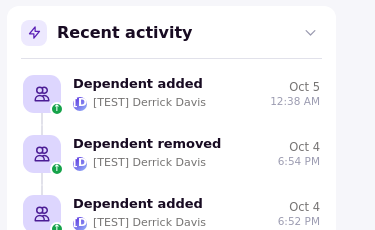
Cause. Every household change is recorded against each member: for example "Dependent group created", "Dependent added", "Dependent removed", "Dependent role changed", status changes, and residencies linked or unlinked.
Fix. Open the member's residency page and read the Recent activity card: it lists entries such as "Dependent added" and "Dependent removed" with the date and time they happened.